Display States
The page automatically switches between Next Session, Active Session, Red Flag, and Season End views depending on the live status of the event.
Mobile view
The livetiming has two ways of displaying data.
- Normal view, which includes all data available.
- Mobile/Compact view which will only hold a few necessary rows of information, which is more practical to view on devices with smaller screens such as smartphones, or simply if you don't want to see all the data.
Flags
When there is an active session we will display the flag of the session (Green, Red, Finish) on the website. (Not included in the Mobile view)
Selecting a Rider
Click on a rider's row in the table to highlight their data across the page.
Note: You can only select two riders at a time for comparison.
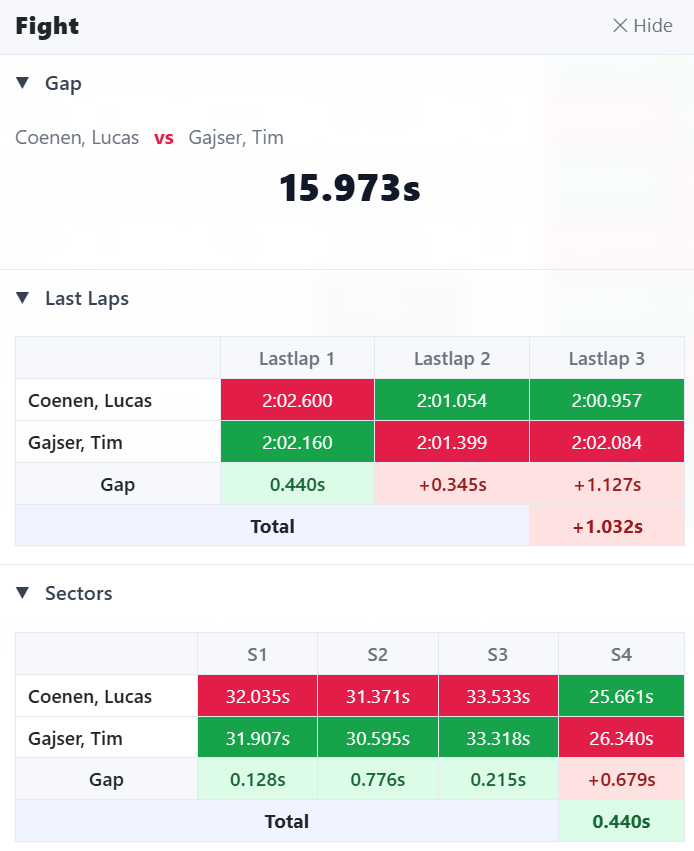
Fight Panel
When you select two riders, the "Fight Panel" appears on the bottom of your screen. The panel provides a side-by-side comparison of their lap times, sector times, and gaps.
Note: The fight panel's data differs by session type, e.g. in practice/qualifying best sectors are shown, while in race sessions the current sectors are shown.
Special rows
The livetiming will partially show 1-2 special columns which show the following data:
- Pos-diff: This column will display the positions made/lost by a rider during a race session. However, we do not take the position on the start list but the position on the first passing for comparison.
- Flag-/Penalty cell: This column will only display two options, a "!" if a rider has a penalty, or a finish flag when the session ended and a rider has passed the finish line.
Note: You can hover or click the "!" to see the reason of the penalty.
Animations
The livetiming includes a few animations which cannot be turned off:
- Pos change: if a rider loses or gains a position, their row will be highlighted in red/green depending on whether they lost or gained a position.
- Estimated position on track: during race sessions we show a blue bar at the bottom of a rider's row which simulates their position on track.
Color Legend
Sector and lap time cells are color-coded:
- Purple: the fastest time overall in the session for that sector/lap.
- Green: a rider's own personal-best time for that sector/lap.
- Red: slower than the rider's previous lap (race sessions only).
- Orange: a close gap to the rider ahead (under 1 second).
Live Updates
All data on this page updates automatically as the session progresses — there's no need to manually refresh the page.